LiveProfit on your phone
No App Store download needed. LiveProfit installs straight from your phone's browser: its own icon on your home screen, full screen, and the same live numbers as on your computer. Takes about 30 seconds.
You need a LiveProfit login (email + password). Most people create it at the end of setup.
No login yet? Open LiveProfit on your computer (from your Shopify admin), go to Settings → About → LiveProfit on your phone, and create one in 10 seconds. Forgot your password? Reset it here.
Open Safari and go to app.liveprofit.io.
Log in with your LiveProfit email and password.
Tap ⋯ next to the address bar, then Share. (Older iPhones: the Share button sits right in the bottom bar.)
Tap Add to Home Screen — scroll or tap "View More" if you don't see it — keep "Open as Web App" on, then tap Add.
Open LiveProfit from its new icon. It stays logged in.
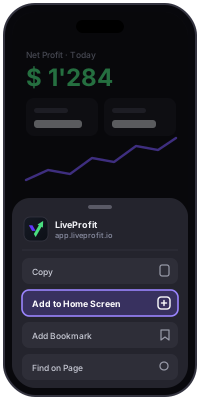
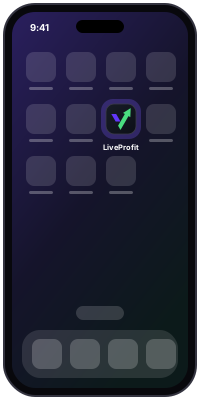
Don't see "Add to Home Screen"? Make sure the page is open in Safari, not inside another app (Instagram, Gmail…).
Open Chrome and go to app.liveprofit.io.
Log in with your LiveProfit email and password.
Tap Install on the LiveProfit bar at the bottom — or open the ⋮ menu and tap Install app (sometimes called "Add to Home screen").
Confirm. LiveProfit appears with your other apps.
What's on the phone
- Your dashboard: today's net profit, ad spend, ROAS, margin — live, for each store or all of them.
- Alerts in the bell when something looks off.
- Product costs and detailed settings stay on the computer, where they're easier to edit.
Stuck? Write to support@liveprofit.io or use the chat in the app.